 BetterSign™BetterSign™
Product · Better OpenSign · preview
Better OpenSign is our build of OpenSign, the open-source document-signing app. You sign in with BetterSign instead of a password, and when a document needs your signature, your phone asks you to approve it.
An OpenSign v2 build whose login is OIDC against our passkey provider, which releases the email you’ve verified for your VLAD, so your account is found by that email. A signing request goes to the BetterSign app, which returns your drawn or typed signature and a signature over the document hash from a dedicated rp:opensign identity.
email claim finds your accountTo sign in: Link your email address in the BetterSign app (Settings → Account → Link an email address), then sign in with BetterSign.
No password to sign in. Your phone to sign.
Better OpenSign is live at docsign.bettersign.ing. Link your email address in the BetterSign app (Settings → Account → Link an email address), then sign in with BetterSign. Your account is found by that verified email. Using it means you agree to the Better OpenSign Terms of Service.
Why it’s better
Many e-signature tools rely on an email link to show who signed. Better OpenSign ties sign-in and signing to the identity on your phone.
You sign in by approving on your phone. There’s no password for a fake page to capture.
OIDC login against our passkey provider, which carries the email you verified for your VLAD; no password is involved.
Your phone shows what you’re signing. Nothing is signed until you approve it there.
The app signs the document hash with its rp:opensign identity key, held on the device.
Built on OpenSign, an open-source alternative to the big e-signature services.
Upstream OpenSign v2, with our sign-in and signing integration added.
See it work
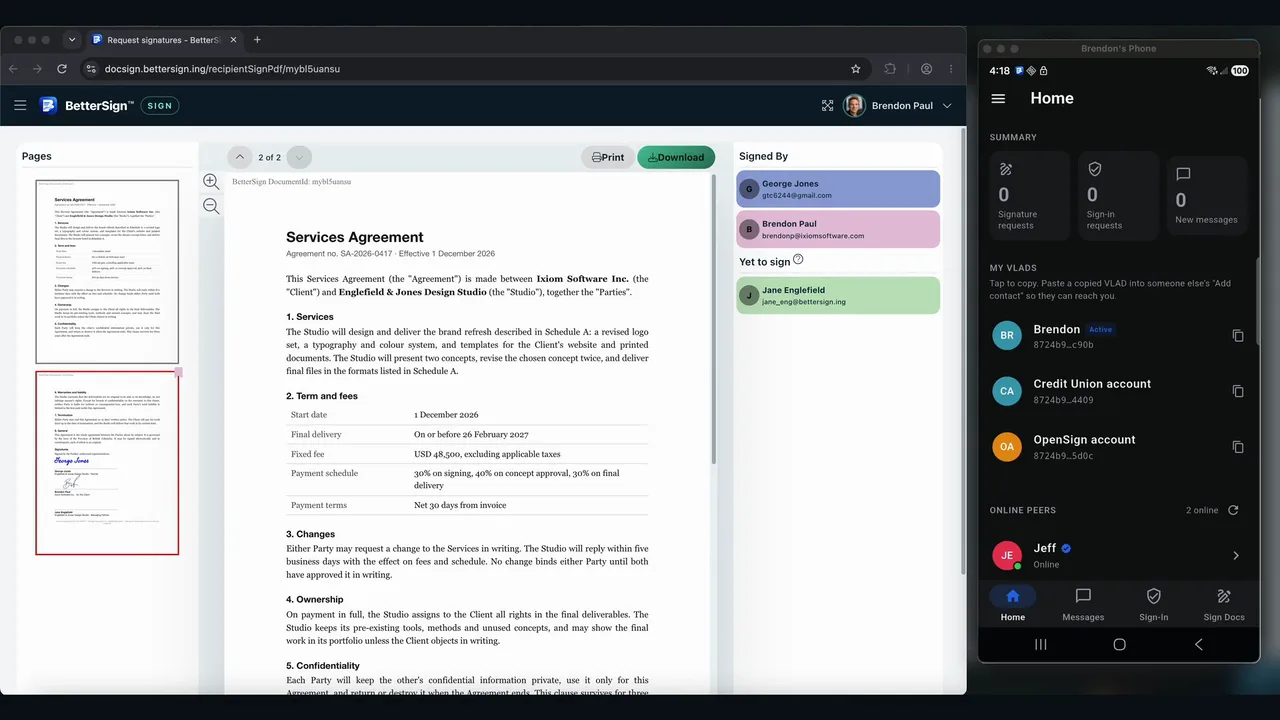
Brendon sends a services agreement to three people, to sign in order. George doesn’t use BetterSign and signs from an emailed link. Brendon approves on his phone. Jane signs in the BetterSign desktop app. Then the finished agreement is opened in Adobe Acrobat.
One envelope, three signers in order: an email-link signer, a Sign on phone signer and a desktop-app signer. The phone and desktop signatures are made with each signer’s own key and added to the PDF without changing what’s already there; the site seals the finished document with its own BetterSign identity, and Acrobat validates all three.
Anyone can sign, with no app and no account: draw or type a signature from the link in their email. There’s an audit trail, like most signing services, but nothing proves who signed.
The email-link signer’s signature is recorded in the audit trail, and the site seals it with its own key. It shows who had the email, not an identity.
Choose Sign on phone, and the request goes to your BetterSign app. Approve with your fingerprint, and a signature made with your own key goes into the document.
The app signs a statement naming the document, the field and the exact signature image, with a key held on the phone; the signature is added to the PDF alongside the image.
The BetterSign desktop app lists what’s waiting for you. Open it, sign, and the app checks the signed copy before it goes back. Anyone can check it in Adobe Acrobat.
A PDF digital signature made on your computer with your own key, added as a new revision and verified in the app before it’s returned to the site.
How it works
Better OpenSign works like the e-signature tools you know. The difference is that your phone, not a password or an email link, proves it’s you.
Sign-in uses our passkey provider over OIDC. A signing request carries the document hash to the app; the app returns the signature image and a signature from the rp:opensign identity, which anyone can check against that identity’s provenance log.
Install the BetterSign app, and link your email address from Settings → Account. We email you a code to confirm it’s yours.
Sign in to Better OpenSign with BetterSign, and approve on your phone.
Upload a document and place the fields, or open one you’ve been sent.
Your phone shows what you’re signing. Draw or type your signature, and approve.
Who holds what
Your signing key never leaves your phone. Better OpenSign receives the signature, not the key.
Questions
Link your email address to your BetterSign identity from the app: Settings → Account → Link an email address opens a page where you sign in with BetterSign, type your email, and confirm the code we send you. Then sign in to Better OpenSign with BetterSign, and your account is found by that email.
An open-source document-signing app, an alternative to services like DocuSign. Better OpenSign is our build of it, with sign-in and signing through BetterSign. See the OpenSign project.
No. The BetterSign app on your computer signs PDFs on its own, offline, and saves the signed copy next to the original. Better OpenSign is for sending documents to other people to sign. Signing PDFs on desktop.
To sign in and send documents, yes: you link your email from it, sign in with it, and approve your signatures with it, on your phone or your computer. Get the app; no sign-up needed. The people you send a document to can sign from the emailed link without it, though nothing then proves who they are.
That depends on the document, where you are, and what the other party accepts, as with any e-signature tool. We don’t claim compliance with a particular e-signature standard yet. If you need that, tell us what you need.
We’re shaping that with design partners: agreements signed by people whose identity your directory already vouches for. Talk to us.
Get the app, link your email, and sign in with BetterSign.